> ## Documentation Index
> Fetch the complete documentation index at: https://docs.bubbl.so/llms.txt
> Use this file to discover all available pages before exploring further.
# Promoters & Links
> Easily track who’s driving your ticket sales, reward your promoters, and measure campaign performance all in one place.
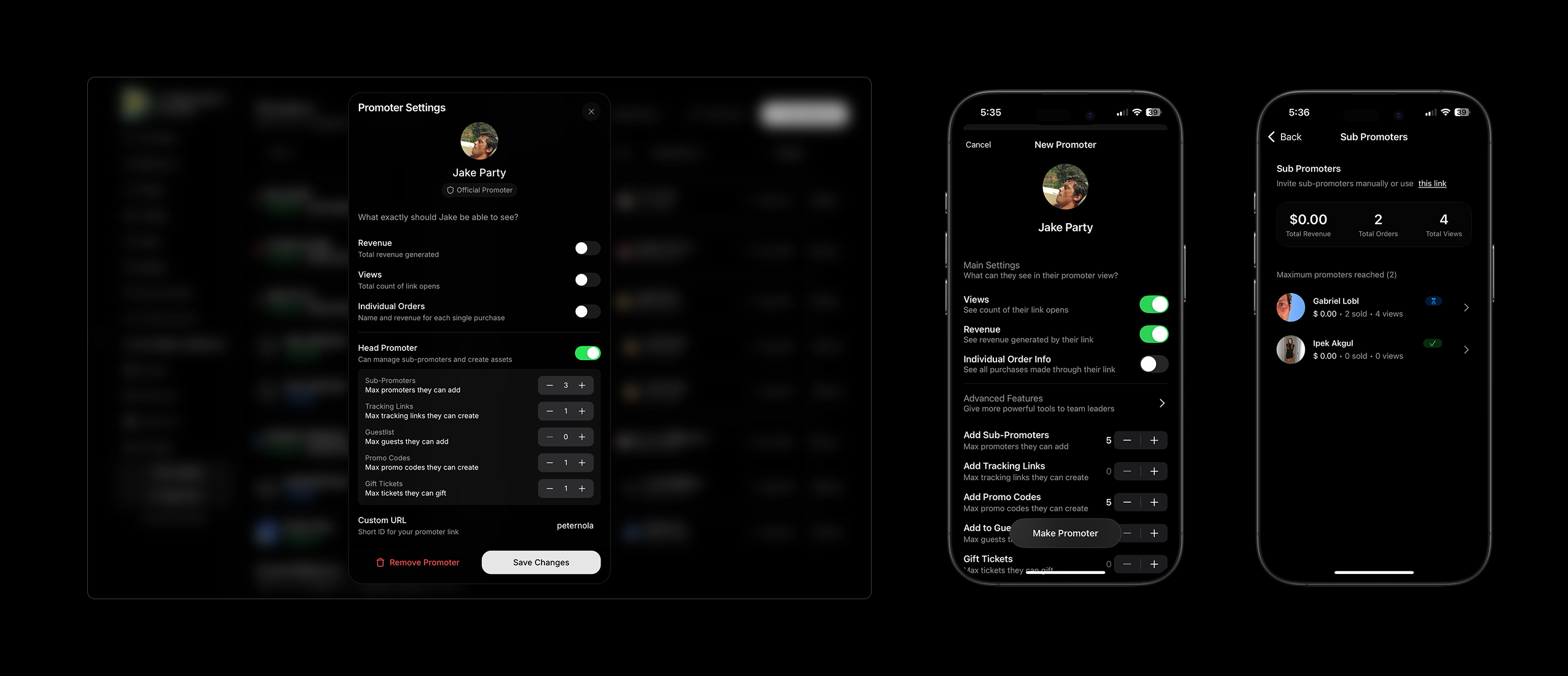 **Promoters**\
When you invite someone to be a promoter for your event, you can now give them the power to add Tracking Links, Promo Codes, Guest Lists, and Gift Tickets if you wish. You can even allow them to add *sub-promoters* and manage their teams now. All of this is visible to you from the app or the dashboard.
1. **Add an existing user** as a Promoter for your event.
2. **Customize** their visibility settings and abilities.
3. Add a custom invite message and **send**!
4. They **receive an invite** as a push notification via the app.
5. They can share their link, track their sales, and do much more things if enabled from their custom view in the app.
**Tracking Links**\
You can create custom tracking links to track how individual URLs are performing.
1. Create a custom ending for the URL.
2. Share and track!
### How It Works
1. **Promoters Share Their Link**\
Each promoter or channel gets a unique tracking URL to share (via social media, DMs, email, etc.)
2. **Sales Get Tracked**\
When someone clicks the link and buys a ticket, the sale is automatically attributed to that link.
3. **You Monitor Results**\
Track sales and revenue per link to see which promoters or campaigns perform best.
4. **Promoter Sell**
Each promoter has access to their view, inside the event page.
## Promoter Teams and Permissions
You can now **create and manage promoter teams** directly from your event dashboard. Invite promoters via **links** and assign specific **permissions** based on their role.
### Adding Promoters
When adding a promoter, there’s an extra step where you can define their permissions whether they can:
* Add or remove sub-promoters
* Create tracking links or promo codes
* Manage guest lists
* Gift tickets
These new settings make it easy to control exactly what each promoter can do within your event.
### Access and Restrictions
Promoters have access to their assigned tools and data but **cannot**:
* Edit event details or documentation
* Add or remove tickets
These administrative actions remain exclusive to **Admins** and **Cohosts**, depending on their permission levels.
### Promoter View
Promoters will access their tools directly from the **event page**. They’ll see a dedicated box that identifies them as an **Official Promoter** and displays everything you’ve granted them access to from guest lists to tracking links.
#### Approval Required
Promoters must accept your invitation before gaining access or being able to promote your event.
#### Custom Messages
When sending an invitation, you can include a personalized message, great for giving context or sharing instructions.
## Tracking Link Features
* **Create Unlimited Links**\
Generate unique tracking links for different promoters, campaigns, or channels (e.g. `TIKTOK`, `INSTAGRAM`, `JUANVIP`).
* **Real-Time Performance Tracking**\
For each link, you can see:
* **Number of views**
* **Total tickets sold**
* **Revenue generated**
* **Campaign & Channel Insights**\
Use different links for Instagram, WhatsApp, email, or promoters — and compare performance side by side.
* **Automatic Attribution**\
Any ticket purchase made through a tracking link is automatically logged and attributed to that link — no extra steps needed.
### Save and Load Promoters and Tracking Links
* **Reuse Promoters & Links:**\
You can **save** **and** **load tracking links and promoters from past events** no need to start from scratch each time.
* **Create Promoter Groups:**\
Group your promoters and their links to manage entire teams or campaigns more efficiently.
**Promoters**\
When you invite someone to be a promoter for your event, you can now give them the power to add Tracking Links, Promo Codes, Guest Lists, and Gift Tickets if you wish. You can even allow them to add *sub-promoters* and manage their teams now. All of this is visible to you from the app or the dashboard.
1. **Add an existing user** as a Promoter for your event.
2. **Customize** their visibility settings and abilities.
3. Add a custom invite message and **send**!
4. They **receive an invite** as a push notification via the app.
5. They can share their link, track their sales, and do much more things if enabled from their custom view in the app.
**Tracking Links**\
You can create custom tracking links to track how individual URLs are performing.
1. Create a custom ending for the URL.
2. Share and track!
### How It Works
1. **Promoters Share Their Link**\
Each promoter or channel gets a unique tracking URL to share (via social media, DMs, email, etc.)
2. **Sales Get Tracked**\
When someone clicks the link and buys a ticket, the sale is automatically attributed to that link.
3. **You Monitor Results**\
Track sales and revenue per link to see which promoters or campaigns perform best.
4. **Promoter Sell**
Each promoter has access to their view, inside the event page.
## Promoter Teams and Permissions
You can now **create and manage promoter teams** directly from your event dashboard. Invite promoters via **links** and assign specific **permissions** based on their role.
### Adding Promoters
When adding a promoter, there’s an extra step where you can define their permissions whether they can:
* Add or remove sub-promoters
* Create tracking links or promo codes
* Manage guest lists
* Gift tickets
These new settings make it easy to control exactly what each promoter can do within your event.
### Access and Restrictions
Promoters have access to their assigned tools and data but **cannot**:
* Edit event details or documentation
* Add or remove tickets
These administrative actions remain exclusive to **Admins** and **Cohosts**, depending on their permission levels.
### Promoter View
Promoters will access their tools directly from the **event page**. They’ll see a dedicated box that identifies them as an **Official Promoter** and displays everything you’ve granted them access to from guest lists to tracking links.
#### Approval Required
Promoters must accept your invitation before gaining access or being able to promote your event.
#### Custom Messages
When sending an invitation, you can include a personalized message, great for giving context or sharing instructions.
## Tracking Link Features
* **Create Unlimited Links**\
Generate unique tracking links for different promoters, campaigns, or channels (e.g. `TIKTOK`, `INSTAGRAM`, `JUANVIP`).
* **Real-Time Performance Tracking**\
For each link, you can see:
* **Number of views**
* **Total tickets sold**
* **Revenue generated**
* **Campaign & Channel Insights**\
Use different links for Instagram, WhatsApp, email, or promoters — and compare performance side by side.
* **Automatic Attribution**\
Any ticket purchase made through a tracking link is automatically logged and attributed to that link — no extra steps needed.
### Save and Load Promoters and Tracking Links
* **Reuse Promoters & Links:**\
You can **save** **and** **load tracking links and promoters from past events** no need to start from scratch each time.
* **Create Promoter Groups:**\
Group your promoters and their links to manage entire teams or campaigns more efficiently.