> ## Documentation Index
> Fetch the complete documentation index at: https://docs.bubbl.so/llms.txt
> Use this file to discover all available pages before exploring further.
# Sell at the Door (Tap to Pay)
> Charge in person straight from the iOS app.
Available in the US, UK, Canada, France, Italy and other European countries.
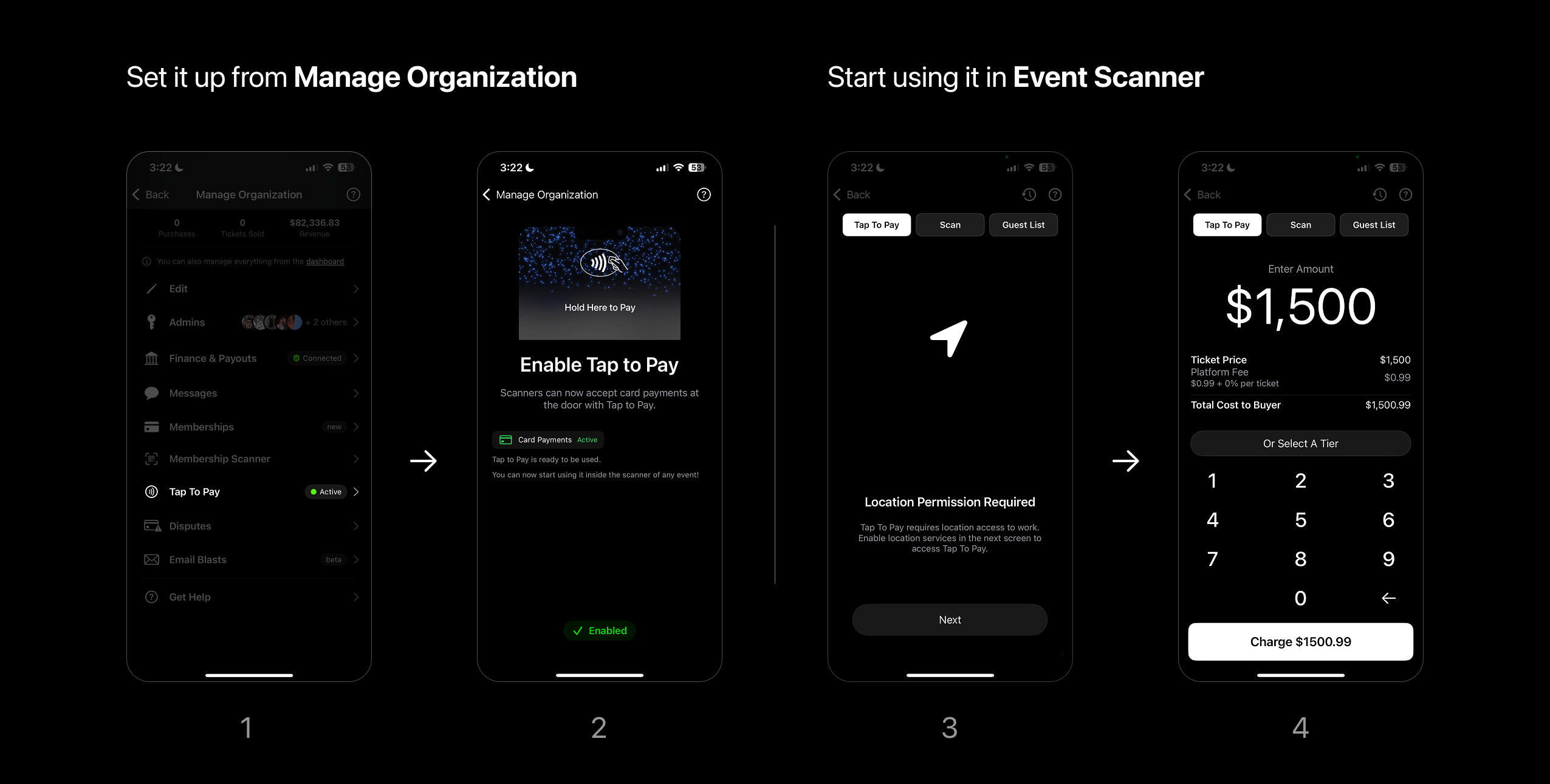 You can accept contactless card payments directly from your phone at the door — no additional hardware needed. It’s ideal for charging **custom amounts** or selling **specific ticket tiers** in person.
**How to use it:**
1. **Enable it** from **Manage Organizations**.
* Tap to Pay > Enable
* Just set it up once to use in any event.
2. **Start using** it within the **Event Scanner**.
* A new tab will appear left of the scan view.
* Enable Location services with Always Allow.
* All iOS scanners will be able to charge at the door.
We recommend setting this up at least a day before an event. As Stripe may require more information after enabling the service.
### What are the ways to charge using Tap to Pay?
#### 1. Custom Amount
You can enter a custom amount to charge:
* Enter an amount and charge to process
* After payment, you'll see a success screen
* You can optionally enter an email to send a receipt
#### 2. **Sell by Ticket Tier**
You can also sell set ticket tiers using Tap to Pay.
* While creating a Ticket Tier, turn Tap to Pay On in tier settings
* Select the ticket tier and adjust quantity if needed
### Where do these orders appear?
All Tap to Pay sales are tracked in your Orders Page alongside your other sales. You can also manually refund Tap to Pay orders directly from the Orders view — just like any other purchase. Revenue appears in your Finances Page and payouts are processed like normal via Stripe.
Only the iOS scanner supports Tap to Pay at this time
You can accept contactless card payments directly from your phone at the door — no additional hardware needed. It’s ideal for charging **custom amounts** or selling **specific ticket tiers** in person.
**How to use it:**
1. **Enable it** from **Manage Organizations**.
* Tap to Pay > Enable
* Just set it up once to use in any event.
2. **Start using** it within the **Event Scanner**.
* A new tab will appear left of the scan view.
* Enable Location services with Always Allow.
* All iOS scanners will be able to charge at the door.
We recommend setting this up at least a day before an event. As Stripe may require more information after enabling the service.
### What are the ways to charge using Tap to Pay?
#### 1. Custom Amount
You can enter a custom amount to charge:
* Enter an amount and charge to process
* After payment, you'll see a success screen
* You can optionally enter an email to send a receipt
#### 2. **Sell by Ticket Tier**
You can also sell set ticket tiers using Tap to Pay.
* While creating a Ticket Tier, turn Tap to Pay On in tier settings
* Select the ticket tier and adjust quantity if needed
### Where do these orders appear?
All Tap to Pay sales are tracked in your Orders Page alongside your other sales. You can also manually refund Tap to Pay orders directly from the Orders view — just like any other purchase. Revenue appears in your Finances Page and payouts are processed like normal via Stripe.
Only the iOS scanner supports Tap to Pay at this time