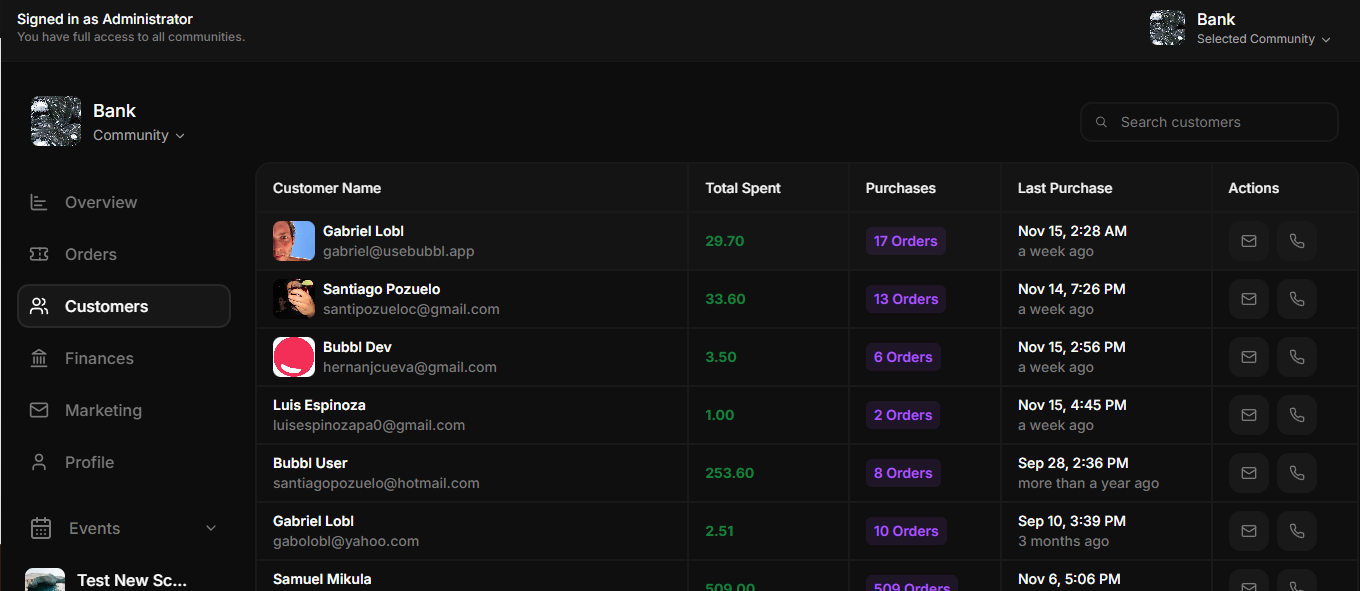
Skip to main contentThe Customers View page provides an overview of all the customers associated with a specific community. This section enables event organizers to track customer activity, spending, and engagement. Below are the main features and functionalities:
Features
- Customer Name: Displays the name and email address of each customer. This allows organizers to identify and connect with their audience effectively.
- Total Spent: Shows the total amount of money the customer has spent across all events in the community. This metric helps organizers identify their top supporters.
- Purchases: Indicates the total number of orders made by the customer, with a clickable link to view detailed order information.
- Last Purchase: Displays the date and time of the customer’s most recent purchase, along with a relative timestamp (e.g., “a week ago”).
- Actions:
- Send Email: Provides a button to directly contact the customer via email.
- Call Customer: Offers a phone icon to initiate direct communication, depending on available contact methods.