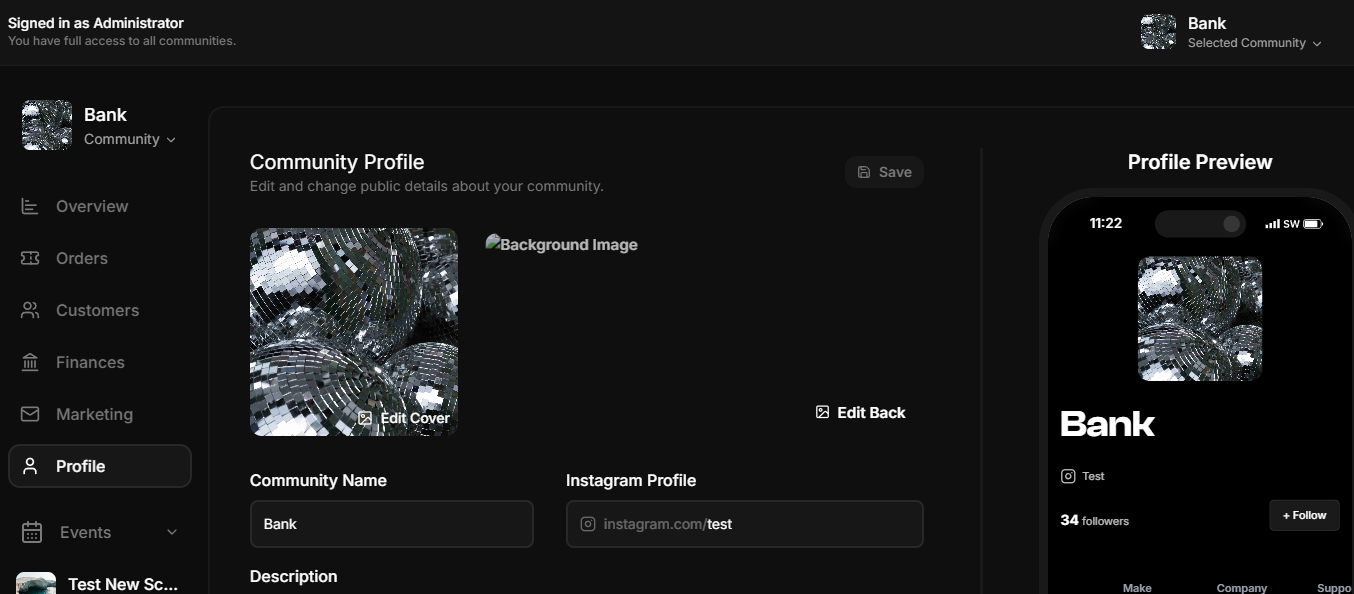
Skip to main contentThe Community Profile page allows organizers to manage and customize the public-facing details of their community. This section is essential for creating a personalized and engaging experience for visitors. Below are the main features and functionalities:
Features
Visual Customization
- Background Image: Allows organizers to upload or update a background image that represents their community.
- Profile Picture: Provides an option to set or change the community’s profile image for better visual branding.
- Community Name: Editable field for the name of the community.
- Instagram Profile: A field to link the community’s Instagram account for seamless social media integration.
- Description: A text area for organizers to write a brief or detailed description about the community, its purpose, or its story.
Location and Privacy
- Location: Dropdown menu to select the community’s base location (e.g., country or region).
- Privacy Settings: Options to set the community visibility as:
- Public: Visible to everyone.
- Private: Restricted to specific users or members.
External Links
- Custom URLs: Option to add up to three external links to the community profile. These can be used for linking to websites, social media pages, or other relevant resources.
Actions
- Save Changes: A button to save updates made to the community profile.
- Edit Background and Profile Images: Easy access to edit and personalize the visual elements of the profile.