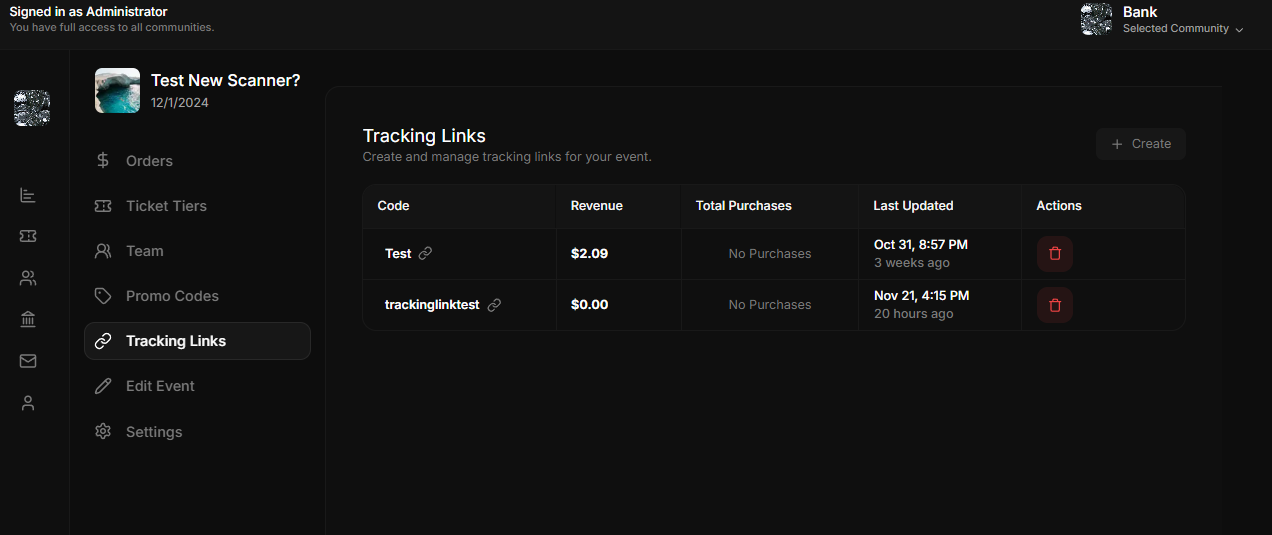
Skip to main contentThe Tracking Links Management page allows event organizers to create and manage custom tracking links for their events. These links are primarily shared by promoters with clients or audiences and are used to track ticket purchases made through these links. This provides valuable insights into the performance of promotional efforts and referral programs.
Features
Tracking Link Details
- Code: Displays the unique alphanumeric identifier for the tracking link (e.g., “Test” or “trackinglinktest”).
- Revenue: Shows the total revenue generated from tickets purchased through the specific tracking link.
- Total Purchases: Indicates the number of tickets sold via the tracking link.
- Last Updated: Displays the date and time when the tracking link was last modified or updated.
Actions
- Delete Tracking Link: The trash icon allows organizers to delete a tracking link, preventing it from being used further.
How Tracking Links Work
- Promoters Share the Link:
- Each tracking link is distributed by promoters to their audience, clients, or specific channels such as social media, email campaigns, or direct messaging.
- Tracking Purchases:
- When a customer clicks the tracking link and completes a ticket purchase, the system attributes the purchase to that specific link.
- Monitor Performance:
- Event organizers can review the revenue and total purchases generated from each tracking link, enabling them to evaluate the effectiveness of their promoters or promotional campaigns.
Creating a New Tracking Link
To create a new tracking link, follow these steps:
- Click the “Create” Button:
- Located at the top-right corner of the Tracking Links page.
- Fill in the Tracking Link Details:
- Code: Enter a unique alphanumeric code for the tracking link (e.g., “SOCIALPROMO2024”). The code is used to generate the unique tracking URL.
- Save the Tracking Link:
- Click the Create button to save the new tracking link. The link is now ready to be shared by promoters.
Use Cases
-
Track Promoter Performance:
Assign a unique tracking link to each promoter. Monitor their contributions to ticket sales and reward top performers.
-
Campaign Effectiveness:
Use different tracking links for various campaigns (e.g., “SOCIAL2024” for social media, “EMAIL2024” for email promotions) to determine which strategy is driving the most revenue.
Incentives
- Encourage promoters to share tracking links widely by offering rewards or incentives based on the number of purchases their link generates.
Purpose
The Tracking Links Management page ensures that:
- Event organizers can track ticket sales effectively.
- Promoters can be held accountable and incentivized based on their contributions.
- Marketing strategies can be optimized based on detailed tracking data.