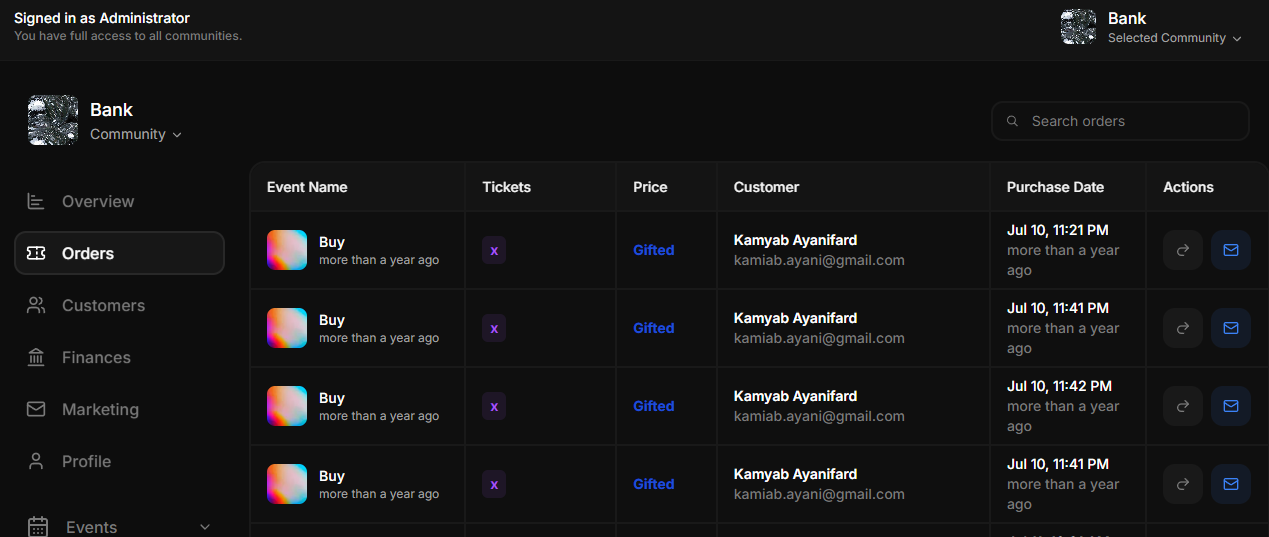
Skip to main contentThe Orders View page provides a detailed table of all orders associated with a community. This section allows event organizers to manage and track ticket sales for their events effectively. Below are the main features and functionalities:
Features
- Event Name: Displays the name of the event for which the tickets were purchased, including an optional event thumbnail for quick identification.
- Tickets: Indicates the number of tickets purchased in each order.
- Price: Shows the price of the tickets, including cases where tickets were gifted or discounted.
- Customer Details: Provides the customer’s name and email address, enabling organizers to contact attendees if needed.
- Purchase Date: Shows the date and time when the order was placed, along with a relative timestamp (e.g., “more than a year ago”).
- Actions:
- Resend Email: Allows organizers to resend the order confirmation or ticket details to the customer’s email.
- Refresh Order Status: Enables organizers to manually update the order status if there are discrepancies or issues.