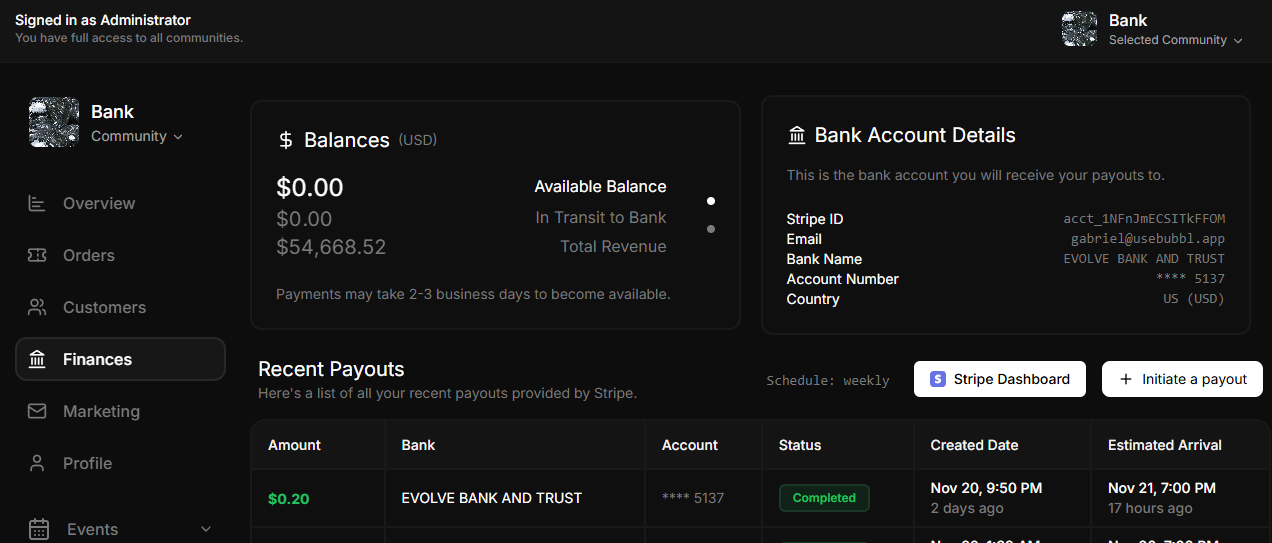
Skip to main contentThe Finances Page provides a comprehensive overview of a community’s financial status and payout details. This section allows event organizers to monitor balances, manage payouts, and review recent transactions. Below are the main features and functionalities:
Features
Balances
- Available Balance: Displays the current balance available for payout.
- In Transit to Bank: Shows the amount that has been processed but not yet deposited into the bank account.
- Total Revenue: Reflects the total revenue generated by the community from ticket sales.
Note: Payments may take 2-3 business days to become available.Bank Account Details
- Provides information about the bank account where payouts will be deposited, including:
- Stripe ID: The unique identifier for the Stripe account.
- Email: Associated email address for the account.
- Bank Name: Name of the receiving bank.
- Account Number: Masked account number for privacy.
- Country: The country and currency associated with the account.
Recent Payouts
- A table listing all recent payouts processed via Stripe, with the following details:
- Amount: The total payout amount.
- Bank: The bank receiving the payout.
- Account: Masked account details for the receiving bank.
- Status: Current status of the payout (e.g., completed, pending).
- Created Date: The date and time the payout was initiated.
- Estimated Arrival: The expected date and time for the funds to arrive.
Actions
- Stripe Dashboard: A quick link to open the Stripe dashboard for deeper financial insights or adjustments.
- Initiate a Payout: A button to manually trigger a payout to the designated bank account.
Additional Functionalities
- Scheduled Payouts: Shows the default payout schedule (e.g., weekly) for automated transfers to the bank.
- Transaction History: Provides an overview of all past financial transactions for complete transparency.