

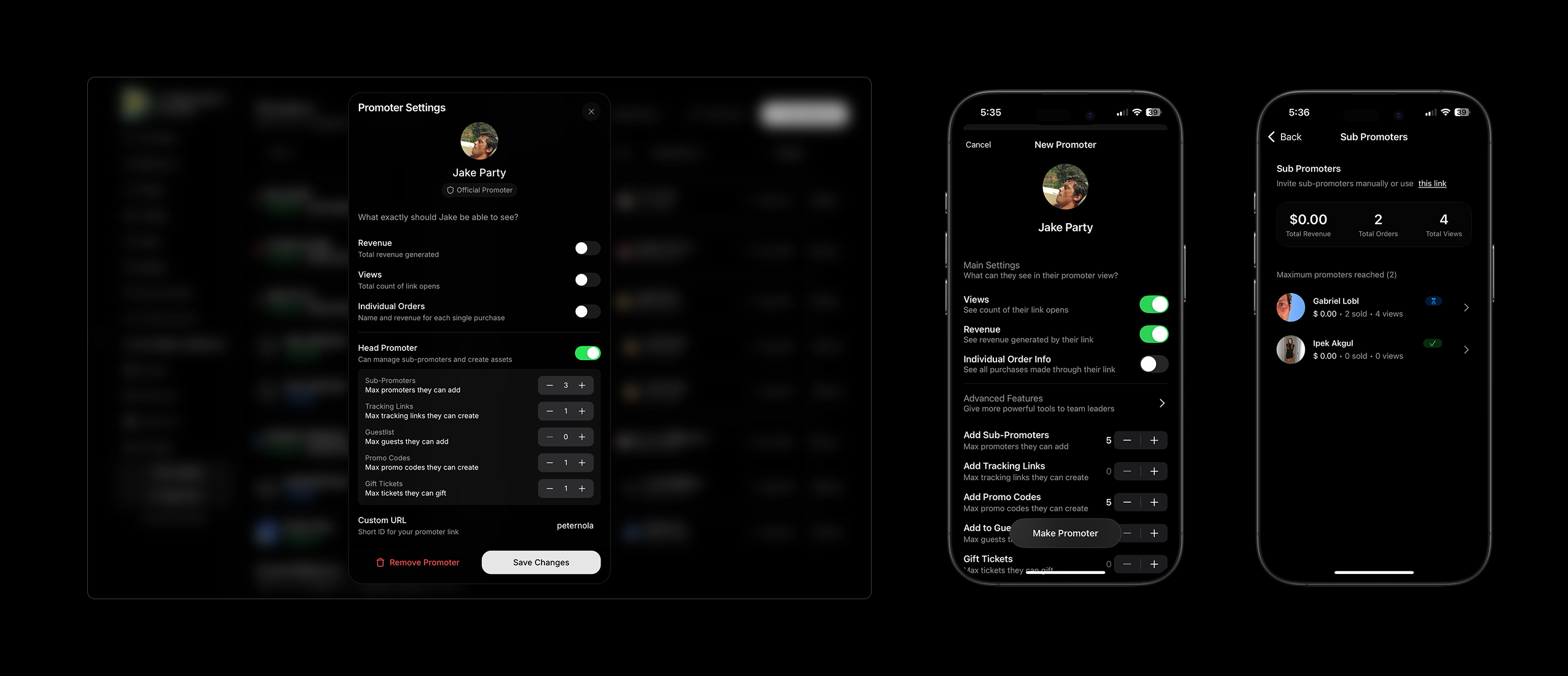
When you invite someone to be a promoter for your event, you can now give them the power to add Tracking Links, Promo Codes, Guest Lists, and Gift Tickets if you wish. You can even allow them to add sub-promoters and manage their teams now. All of this is visible to you from the app or the dashboard.
- Add an existing user as a Promoter for your event.
- Customize their visibility settings and abilities.
- Add a custom invite message and send!
- They receive an invite as a push notification via the app.
- They can share their link, track their sales, and do much more things if enabled from their custom view in the app.
You can create custom tracking links to track how individual URLs are performing.
- Create a custom ending for the URL.
- Share and track!
How It Works
-
Promoters Share Their Link
Each promoter or channel gets a unique tracking URL to share (via social media, DMs, email, etc.) -
Sales Get Tracked
When someone clicks the link and buys a ticket, the sale is automatically attributed to that link. -
You Monitor Results
Track sales and revenue per link to see which promoters or campaigns perform best. - Promoter Sell Each promoter has access to their view, inside the event page.
- Promoters
- Tracking Links
Promoter Teams and Permissions
You can now create and manage promoter teams directly from your event dashboard. Invite promoters via links and assign specific permissions based on their role.Adding Promoters
When adding a promoter, there’s an extra step where you can define their permissions whether they can:- Add or remove sub-promoters
- Create tracking links or promo codes
- Manage guest lists
- Gift tickets
Access and Restrictions
Promoters have access to their assigned tools and data but cannot:- Edit event details or documentation
- Add or remove tickets
Promoter View
Promoters will access their tools directly from the event page. They’ll see a dedicated box that identifies them as an Official Promoter and displays everything you’ve granted them access to from guest lists to tracking links.Approval Required
Promoters must accept your invitation before gaining access or being able to promote your event.Custom Messages
When sending an invitation, you can include a personalized message, great for giving context or sharing instructions.Save and Load Promoters and Tracking Links
- Reuse Promoters & Links:
You can save and load tracking links and promoters from past events no need to start from scratch each time. - Create Promoter Groups:
Group your promoters and their links to manage entire teams or campaigns more efficiently.